Summary
My Role
Designer Doing Research
Cross-Functional Team
2 Product Managers, 3 Engineers
Target Users
HR Professionals of Contingent Program, including Staffing Specialist & Program Specialist
Problem
The Onboarding System consisted of several patchwork features and unstructured information architecture that hindered users from completing onboarding tasks efficiently, delaying workers’ start dates and directly impacting the sourcing metrics of customers’ partners. My goal was to make the onboarding system more coherent & scalable for the efficiency of end users.
Business Impacts
- Influenced the Product team to revise product roadmap to holistically address functionality gaps and strategically respond customer expectations as well as user needs in a longer run;
- Accurately informed Product partners the risks and opportunities for a 12-month development plan;
- Reduced up to 50% the cost of developing and testing individual features, in comparison with the initial plan;
- Improved user’s navigation between onboarding tasks by 23%.
Context
Completing onboarding checklists is a crucial part of the hiring and onboarding process. Workday VNDLY allows customers to set up custom checklist items and assign them to end users. The user workflow has 2 parts: staffing agencies submitting required documents on behalf of the candidates, and program specialists on the customer side reviewing & approving the documents. Additionally, the contingent staffing model is characterized by short turn-around times, typically 24–48 hours, along with an extremely high worker population.
Business Case
As VNDLY won more deals in the Healthcare and Professional Service industry, the system needed to accommodate higher standards of the candidate onboarding process. Customers expected the system to grow beyond “document storage” and better assist users throughout the workflow.
The top #1 story for the Onboarding System:
As a program manager, I need custom fields on checklist items so that I can capture candidate information during the Sourcing flow and pull reports for my customers later.
ranked by Field Teams and prioritized by Product Leadership.
What does success look like?
- Customizable: Address global customer needs, varied by country and industry;
- Efficient: Improve the time-on-task metrics of the onboarding process;
- Transparent: Enable quick insights into onboarding documents and communication between the staffing agencies and program specialists throughout the task flow.
Process
Research
My cross-functional team sat down together to pinpoint functionality gaps and opportunities for development. However, the team lacked use cases to scope out the work and prioritize effort, which was a critical challenge when we had to build new features while also mending a patchwork system within the promised 6-month development timeline. I helped the team with research to better understand user needs and customer expectations on the deliverables.
Under the time constraint and huge knowledge gap, I became creative with my research approach: co-ferment user-interview and card-sort methods, in combination with thorough desk research, allowing me to identify the right problems to solve while also evaluating the existing system. The whole process was done within 2 months, well before the project kick-off, leaving time for leadership to make a decision.
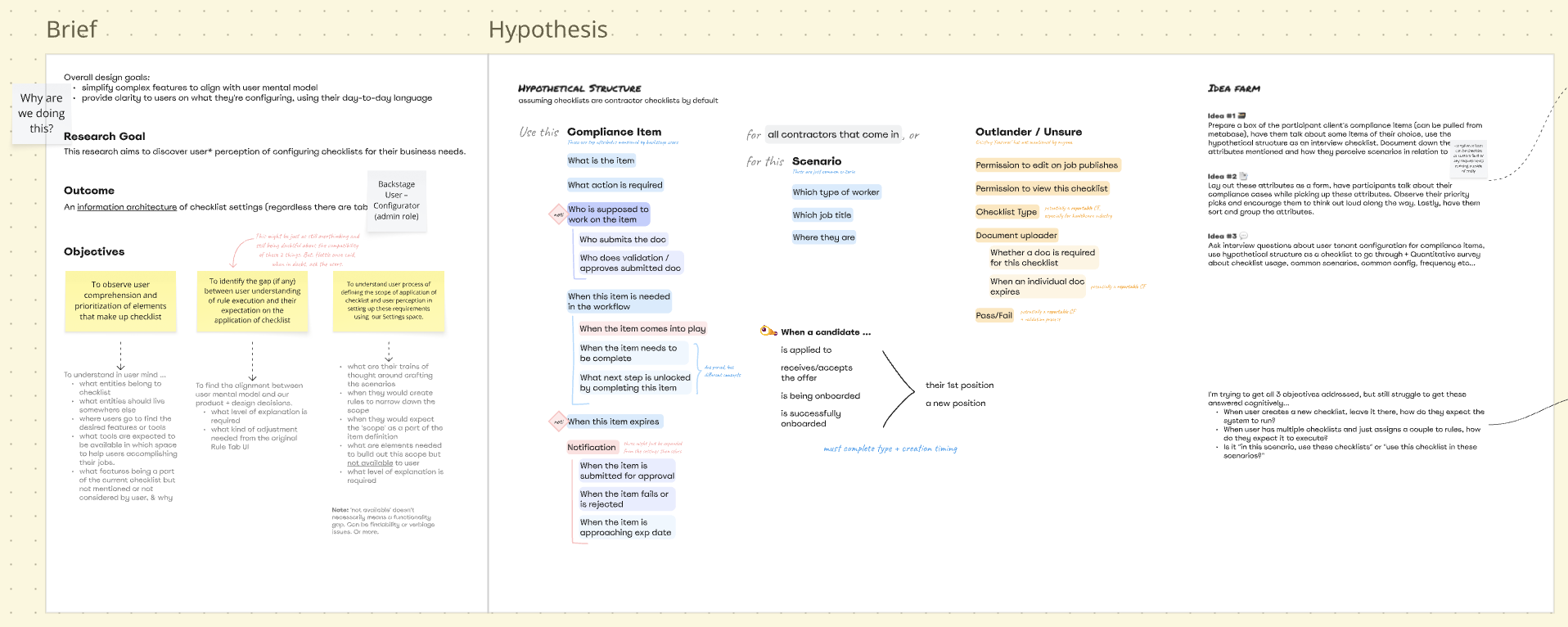
The Planning Office
research objectives, research questions, & hypothetical information architecture—all that leads to the design of the 'double-fermentation' study. there is also evaluation of what can be answered (the blue cards stacked to the left of the Hypothesis board) and what not + mitigation approach (the orange cards to the right).
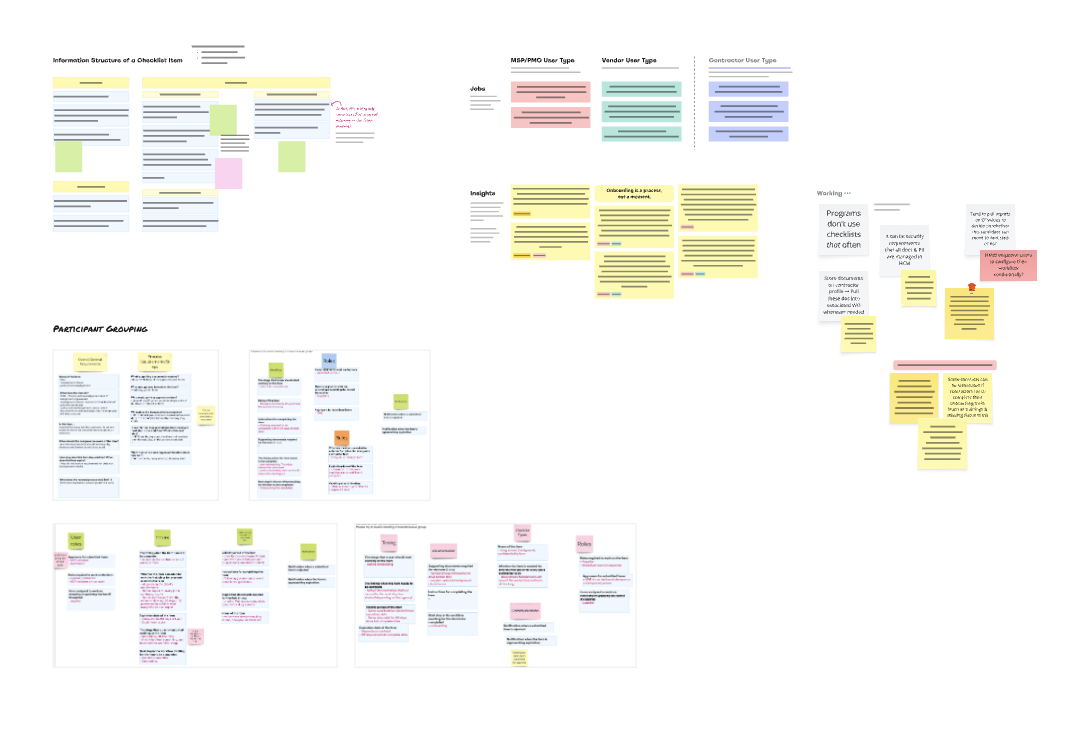
The Double Fermentation
a dual-phase session that leverages real-time synthesis to gather contextual information & identify requirement gaps, which are then immediately run through a live card-sort exercise to evaluate the proposed information architecture. the approach is effective in recalling user memories and gaining rich context for every data point. applying this method, I can extract high-quality, directional data that serves as a reliable foundation for evidence-based design.
Crucial findings:
- Users found the Custom Field product convenient because it’s flexible to set up and the data captured through custom fields is reportable. However, this product had a limitation: the data couldn’t be synced across system forms.
- A checklist will block a candidate from onboarding until they complete all required items. Customers valued this “blocking” feature the most from the existing Checklist product and wanted to have more of this throughout the workflow.
These findings (along with a million of others) has repositioned the problem to
HMW enable programs to further customize requirements at different stages of the sourcing pipeline?
Outcomes
By evaluating the user's perception on overlapping functionalities, I helped the team to derisk technical migration. More importantly, my insights provided a holistic view of customer expectations, which informed the strategy for a cohesive system, providing greater values to a wider net of customers.
By introducing multiple “check points,” Program users would be able to screen candidates earlier, ensuring compliance and qualification to move on, saving time and resources downstream.
Recommendation Highlights
- Expand capability of Checklist as a product to serve beyond the Onboarding stage;
- Enable the custom data captured in each checklist item to flow throughout the pipeline.
Without addressing these, the business would risk adoption rate of the new feature in the initial plan, which was to only introduce Custom Field to Checklist.
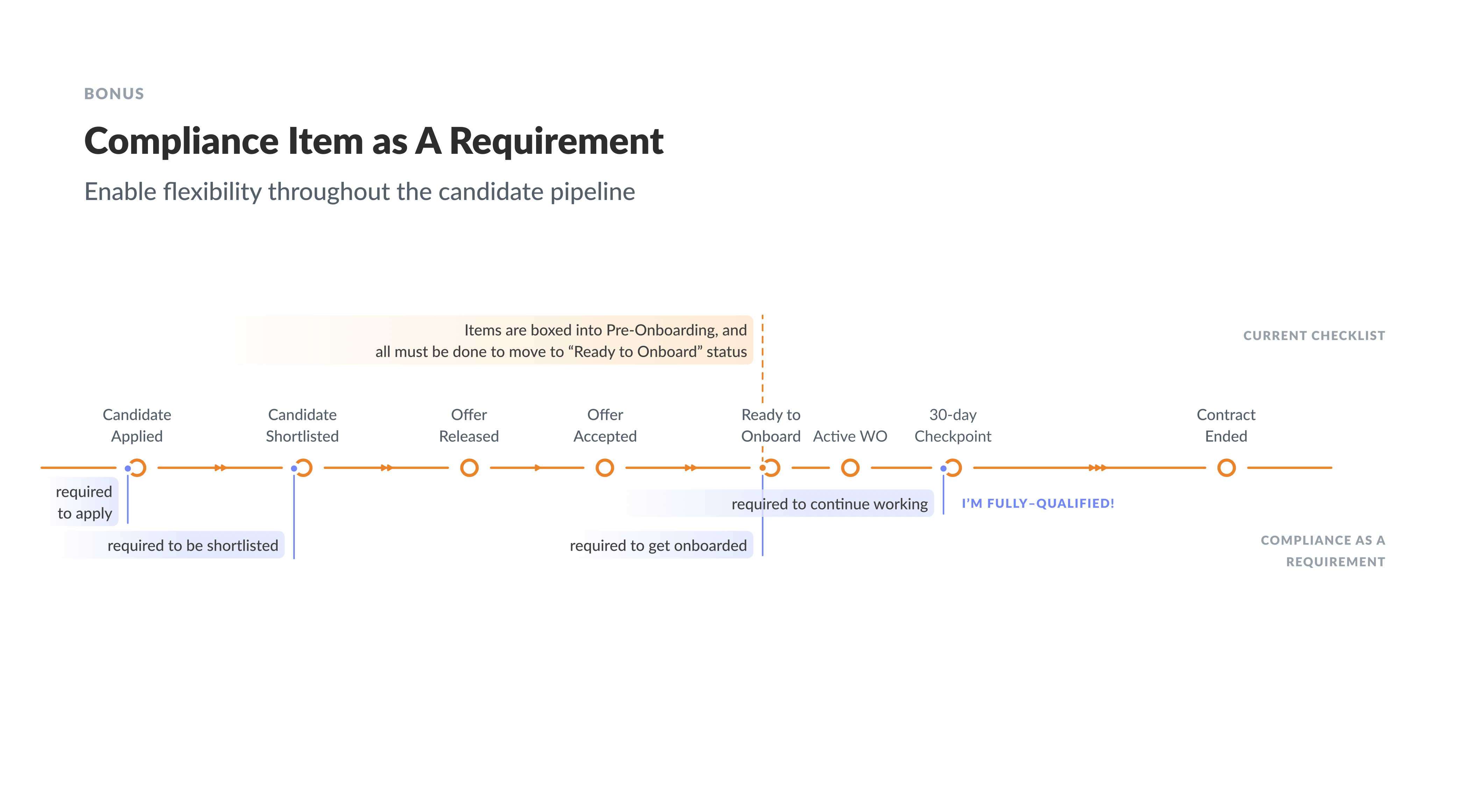
The Visualization
comparison between the existing and proposed models. the diagram shows how expanding the product will enable more flexibility for customers.
What could have been better?
If I were to revisit this project, I would visualize the total experience, mapping out the user-system interactions throughout the sourcing pipeline. This would act as a North Star for the cross-functional team to see the holistic impact of the proposed system.
Instead of delivering a comprehensive research report, I would have translated recommendations into an incremental strategy, making the long-term vision feel more achievable through small, iterative milestones.
Design
In prior experience, end users can simply complete checklist items through a modal, by entering dates and uploading documents. Since new customization features being introduced led to higher complexity, increased cognitive load, and lower user productivity. Therefore, the product needed a new end-user experience to enable efficiency and scalability.
The design exploration & experimentation was conducted in parallel with the research to keep both findings in sync. I collaborated with another designer to conduct experience review, pattern analysis, and concept validation with internal functional consultants for research cost saving.
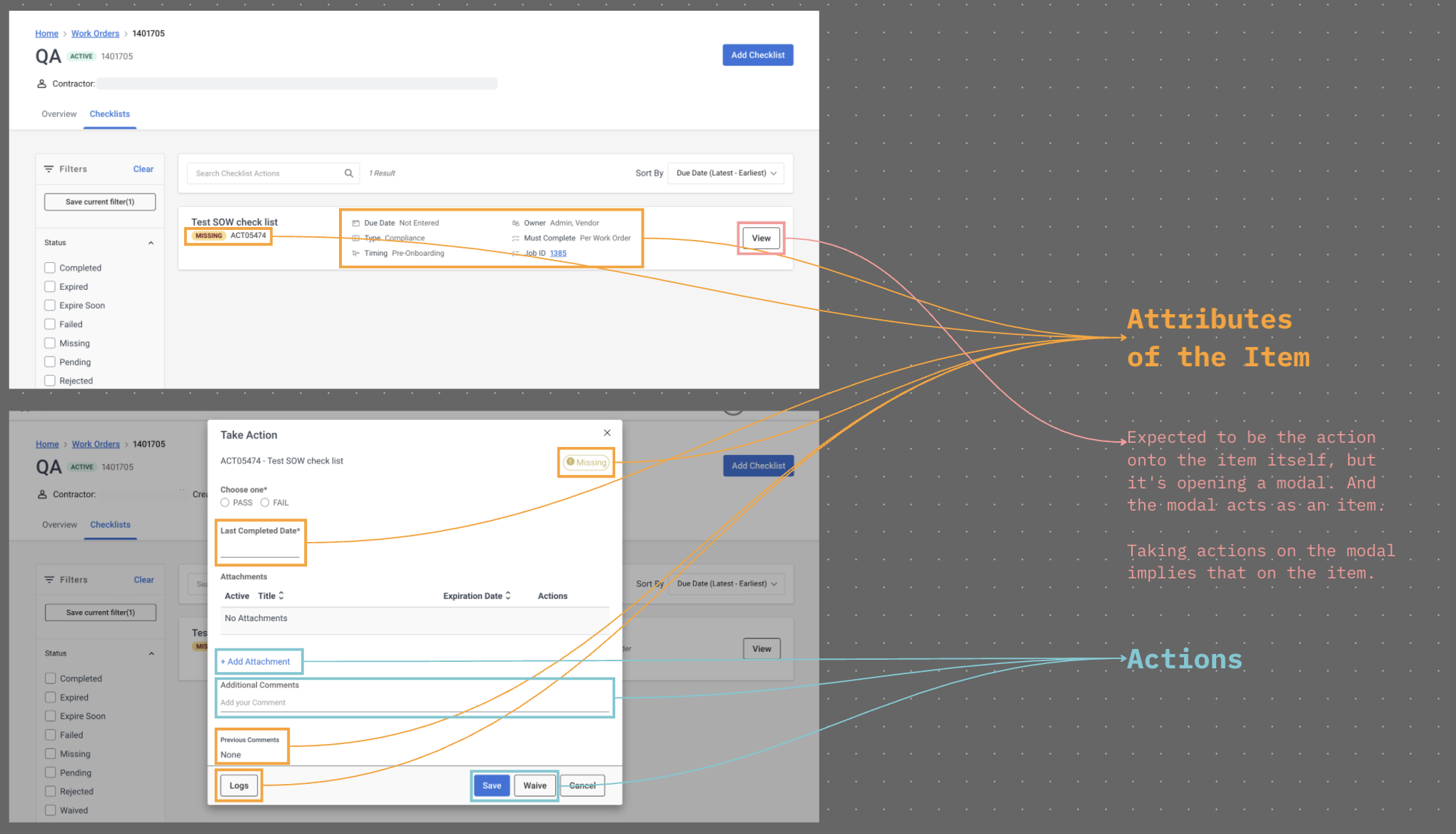
The Interaction Map
the “view” button on the list item is used to open a modal, and the modal now acts as the list item. a user has to take action on the modal while their intention is to take action on the item itself. these redundant interactions creates unnecessary cognitive load onto users.
The Anatomy Study
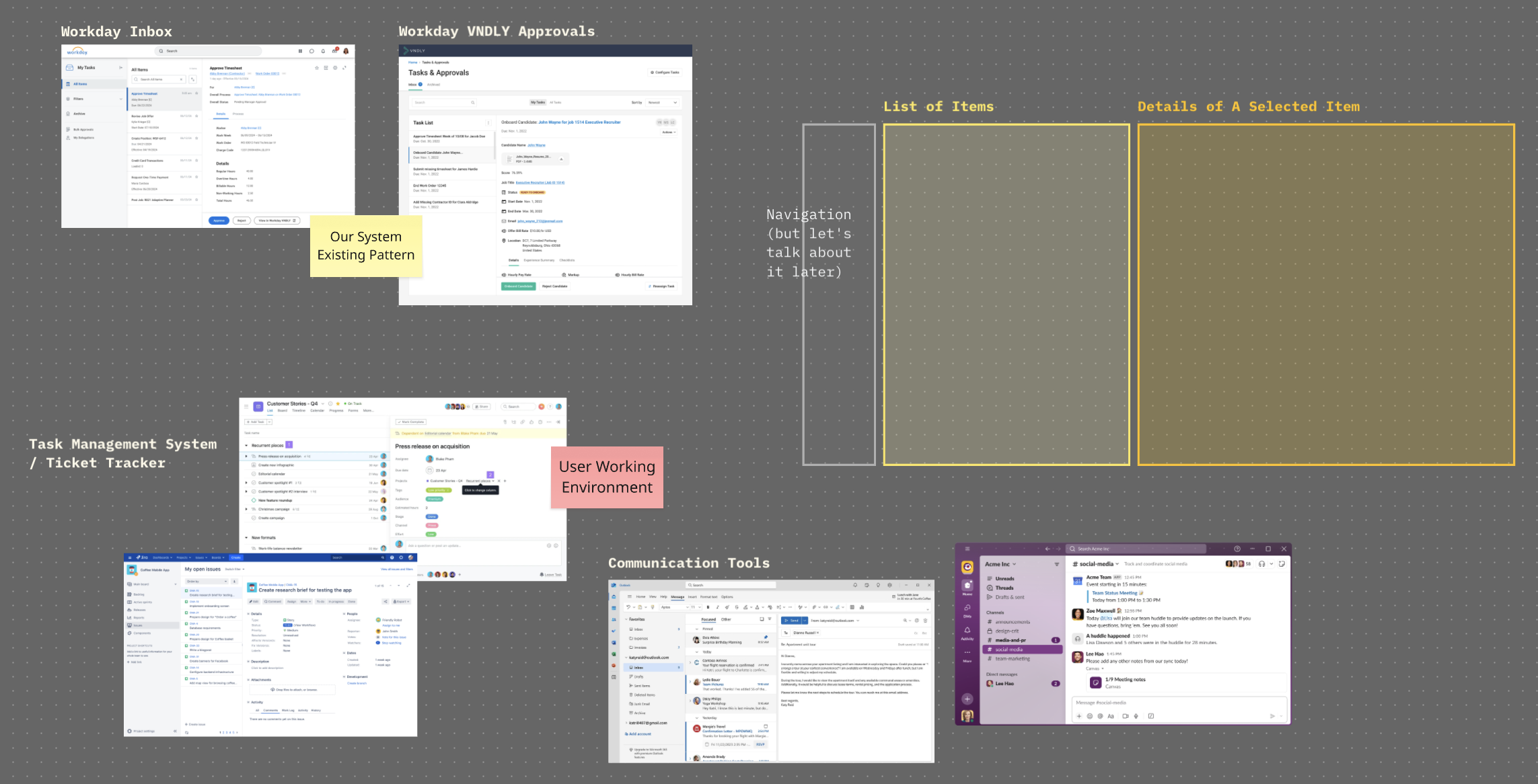
snapshots of task management systems, such as Workday inbox, VNDLY approvals, Jira, Asana, and communication tools like Slack and Outlook. all of them have a list of items on the left-hand side, and a detailed view on the right-hand side. the detailed view contains necessary data for a user to make decisions and take action on the item directly.
Results
I introduced a more structured information & interaction architecture that met the user's mental model about completing checklist items. The new pattern was validated to improve user navigation by 23% and able to handle extensive customization use cases.
Learning highlights:
- Users perceive checklist items as tasks.
- A split layout is commonly used in tasks management systems since it reduces cognitive load on navigation and time on task.
We decided to convert the original modal to the split layout. This approach aligned with the Workday ecosystem and other productivity tools in implementing the Tasks concept, helping with the user's learning curve throughout the transition.
The Design
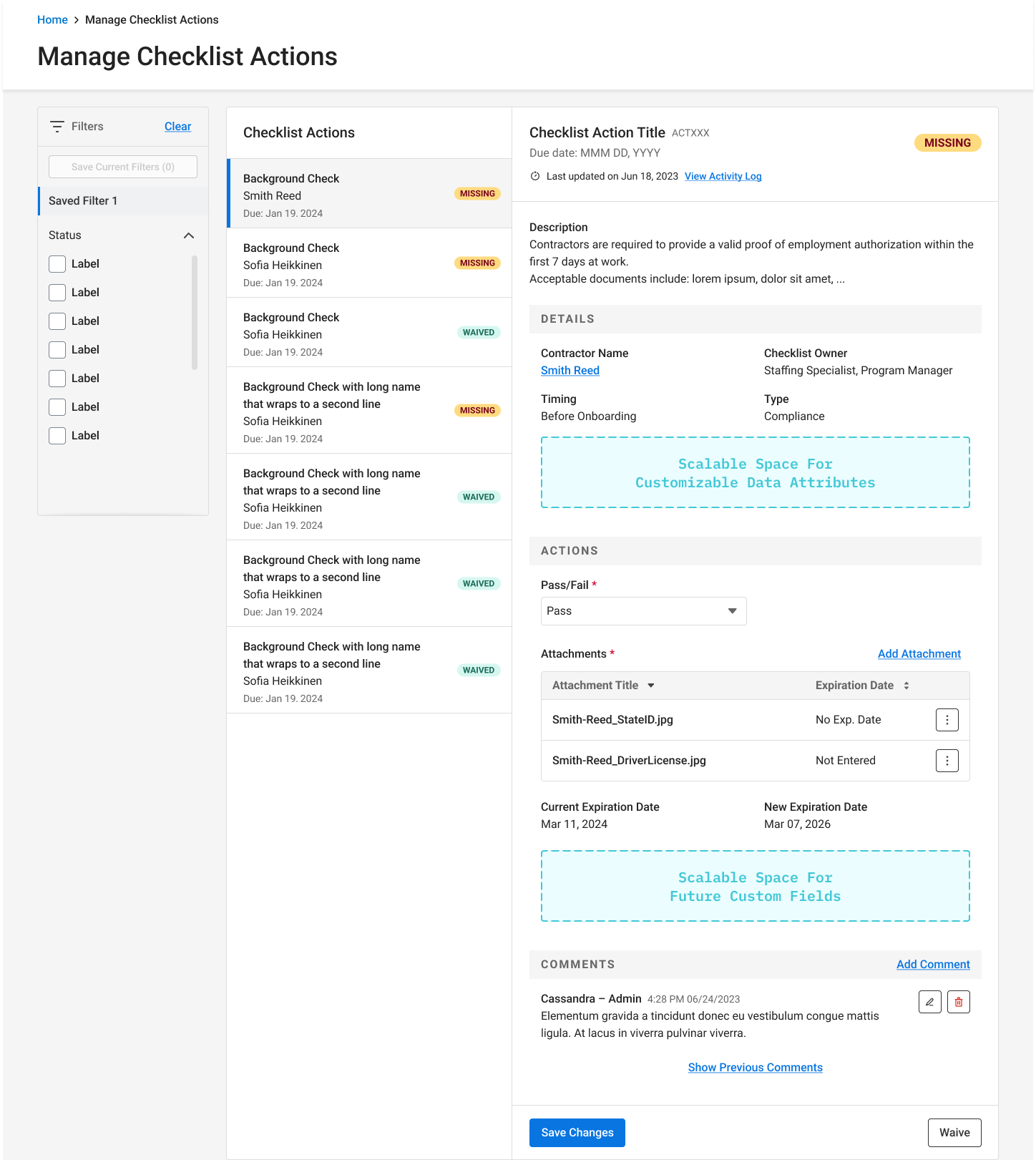
this layout enables users to view items through navigation on the list to the left, reducing the cognitive load and redundant action created by the original “view” button. by restructuring static information and actions into 2 separate sections, the design helps users know what to focus on to complete their onboarding requirements. the detail view on the right side allows more scalable spaces for customizations, preventing the modal from growing and being scrollable.
The Hand-Off Canvas
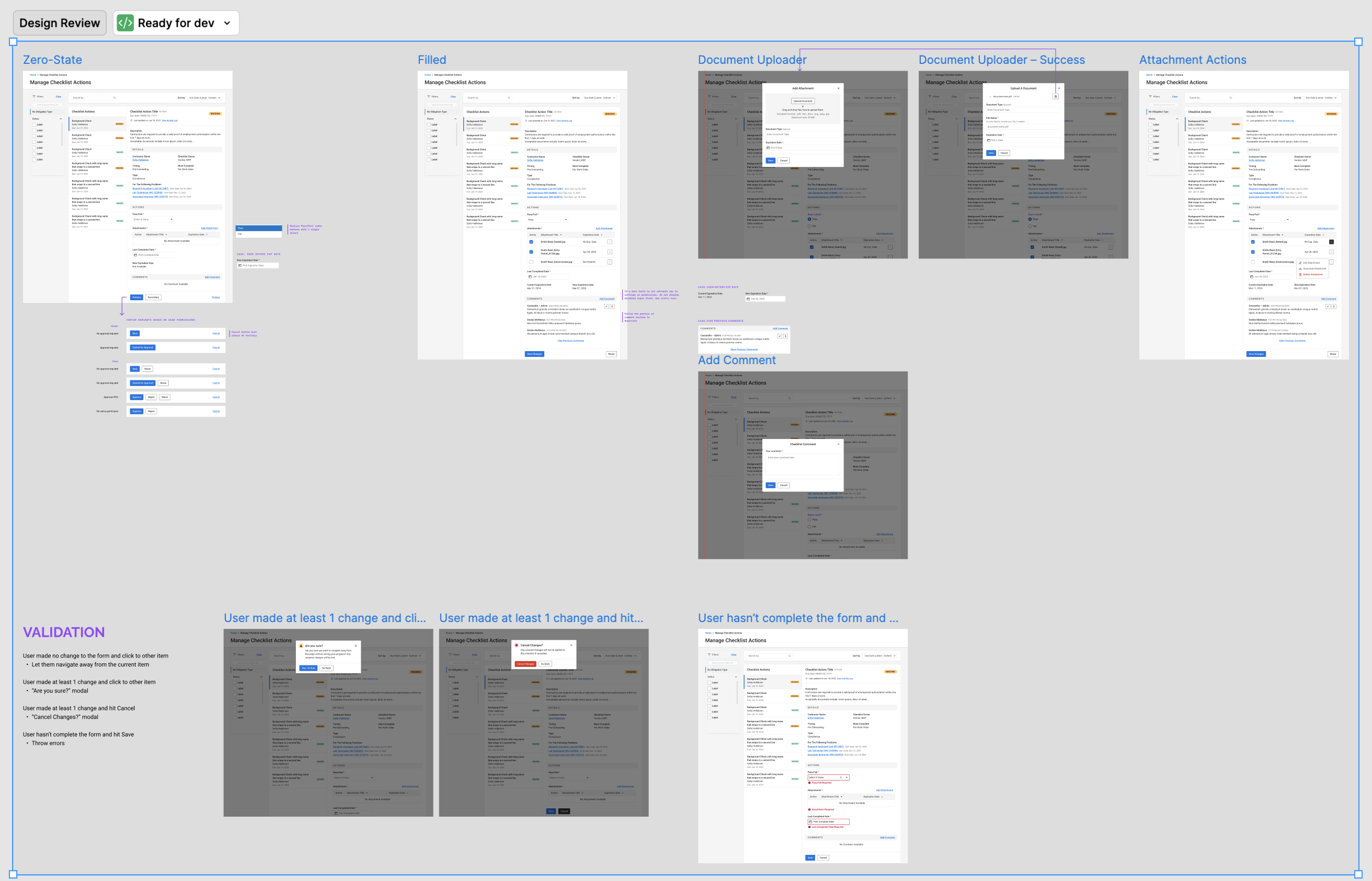
simple and straightforward, including clear scenarios with a component variant for each case, demonstration of a new design for document uploader, and instructions for alert components based on different form validations.
What could have been better?
Replacing a design pattern was a significant shift that required a deeper analysis of development effort. I should have compared risks and opportunities between the old and new designs to help my PM mitigate potential hurdles.
This project has reinforced my belief that scoping must apply at the system level before the pixels are even set. By involving engineers earlier to lock in the core requirements, the design would be an honest reflection of what the team can build, avoiding the pitfalls of a fragmented deliverable that loses its integrity when features are simply trimmed away.